
Shopify Credit Card Fraud Prevention
What to Do When Credit Card Fraud Bots Target Your Shopify Store

Shopify credit card fraud prevention is not something I planned on managing over the busy holiday season, but it was necessary. If you’ve ever woken up to dozens (or hundreds) of failed orders, charge attempts for small or odd amounts, or payment alerts that make your stomach drop… you’re not alone. Shopify stores are frequent targets for credit card testing bots, and when it happens, it can feel overwhelming and urgent.
Not only are you risking your reputation, you’re also on the hook for transaction and processing fees—even when fraudulent charges are reversed or never fully captured. Left unchecked, those fees add up fast.
The good news? You can stop it fairly quickly if you know what to do.
Here’s a simple, practical checklist based on my recent real-world experience dealing with active fraud attempts on my Shopify store.
1. Recognize the Signs of Credit Card Testing
Fraud bots don’t behave like normal shoppers. Common red flags include:
-
Multiple failed payment attempts in minutes
-
Very small order amounts (often under $5)
-
Repeated checkouts using different cards
-
Orders with mismatched names, emails, or billing details
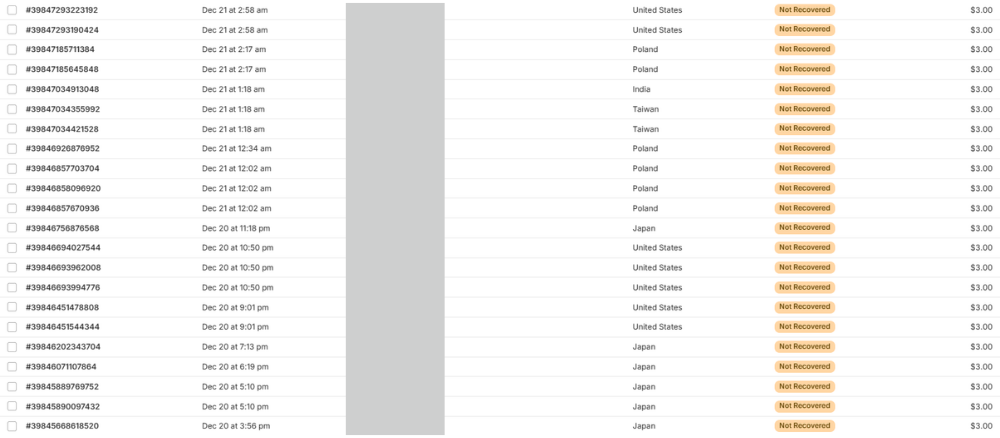
If you see this pattern, assume automation (not a human) and act fast. I was getting BOMBARDED with these types of transactions for days.
2. Turn On Shopify’s Built-In Fraud Protections
Start with what Shopify already offers:
-
Enable reCAPTCHA at checkout
-
Turn on address verification (AVS) and CVV checks in your payment settings
-
Review your fraud filters and risk analysis tools
These won’t stop everything, but they reduce low-effort attacks.
3. Add Cloudflare for Real Bot Protection
This is where the biggest improvement usually happens.
Using Cloudflare in front of Shopify allows you to:
-
Block known bot traffic before it ever reaches checkout
-
Challenge suspicious behavior with browser checks
-
Rate-limit requests so bots can’t hammer your site
Even Cloudflare’s free plan can dramatically reduce attacks.
4. Use Shopify Flow to Auto-Block Suspicious Orders
If you’re on a Shopify plan that supports it, the app Shopify Flow is powerful.
You can create simple rules to:
-
Cancel or flag orders with repeated failed payments
-
Block customers after a certain number of attempts
-
Automatically tag or notify you when patterns appear
This turns a reactive problem into an automated one.
5. Temporarily Lock Things Down and Manually Authorize Payments
If the attack is active and intense, don’t be afraid to slow things down intentionally.
Consider:
-
Switching your payment gateway to manual payment authorization, so charges are not automatically captured
-
Reviewing and capturing only legitimate orders
-
Temporarily disabling express checkout options
-
Pausing instant-delivery digital products
-
Adding a minimum order value
Manual authorization creates friction for bots while still allowing real customers to place orders. This step is temporary, but extremely effective while protections are being implemented.
6. Monitor for a Few Days After
Fraud bots often come in waves. After things quiet down:
-
Keep an eye on failed payments
-
Review analytics for unusual traffic spikes
-
Leave protections in place (don’t undo them too quickly)
Prevention beats cleanup every time.
Final Thoughts
Credit card testing isn’t a sign that you did anything wrong, it’s simply the cost of operating online. What does matter is how quickly and calmly you respond.
A layered approach – Shopify settings, Cloudflare, automation, a brief lockdown, and continuous monitoring – is what worked for me. Luckily once I recognized the attempts and started implementing these actions things slowed down pretty quickly. Within a few days the fraudulent attempts stopped completely. (Hopefully the bots decided my site was too much work for no results!)
📌 Don’t forget to pin this for later:
Want more real-world Shopify tips like this?
I share practical advice for small business owners.
👇 Join my mailing list for behind-the-scenes fixes, tools I actually use, and lessons learned the hard way.